For NJ Transit riders on iPhone
Stop staring
at the board.
Tap the train you're taking. TrainTrack watches NJ Transit's departure board for you and puts the track, the boarding call and every change on your lock screen, so you can wait anywhere but under the screens.
Your 6:15 home, without looking up once.
Every moment you'd otherwise catch on the board, delivered.
-
5:49
Leave by 5:49
It works out when to set off for the station from where you are, and nudges you when it's time. No refreshing, no guessing.
 Time to leaveHead to New York Penn Station now for train 3839 to Trenton at 6:15 PM.
 -
6:03
Track 13
No hovering in the concourse. The moment the board posts the track, it's on your lock screen, and if it changes, you hear about that too.
Track 13 assignedTrain 3839 to Trenton departs New York Penn Station from track 13. -
6:09
Boarding
Now boarding, then All aboard. The Live Activity on your lock screen and Dynamic Island counts down to the minute, then says Departing.
Train 3839 · Trenton6:15 PMBoarding · leaves in 6 minTRACK13 -
6:15
On board
Your next stop and your own stop, side by side, with a live arrival estimate that says plainly when you're running late.
NEXT STOPSECAUCUS6:24 PM · in 9 minYOUR STOPTRENTON6:32 PM -
6:32
Home
Arrived at Trenton. It wraps up quietly a few minutes later.
The board, in your pocket.
Pick two stations and tap your train. That's the whole setup. TrainTrack keeps checking NJ Transit for you, with your phone locked too, and the trains you take every weekday can start tracking on their own.
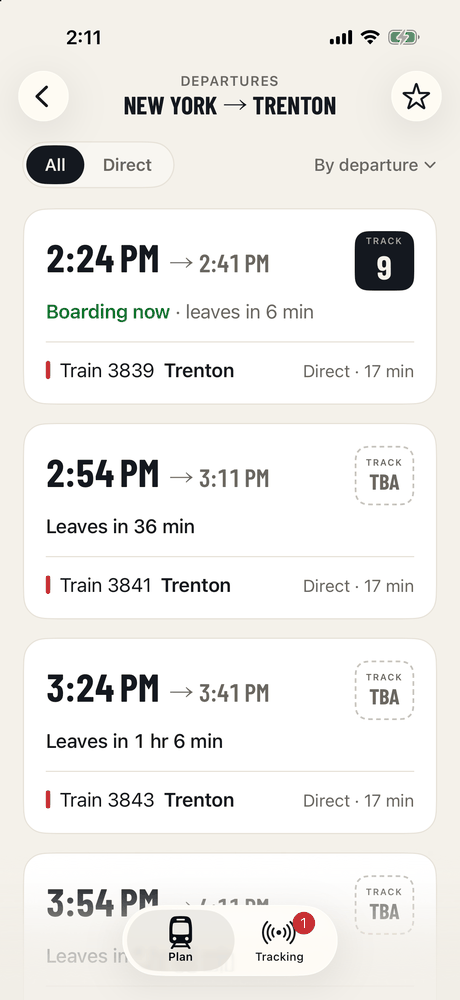
Find your trainDirect trains and one-transfer connections show together, with live tracks and status. 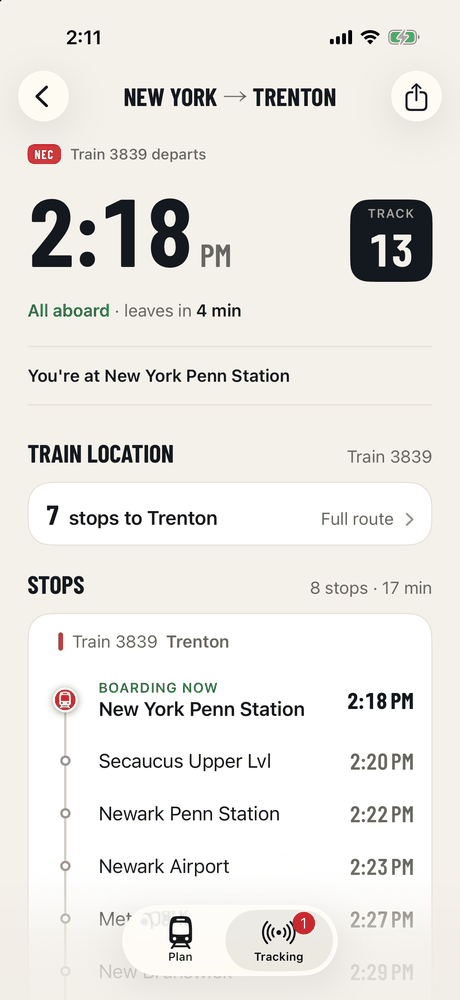
Tap itThe track the moment it's posted, when to leave for the station, and every stop. 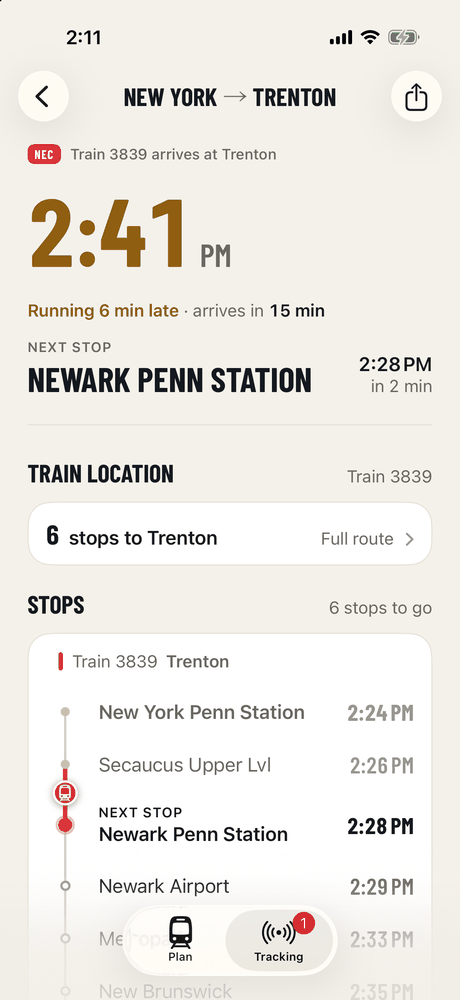
RideYour next stop leads, with a live arrival estimate that says plainly when you're running late.
Transfers
One change, both trains watched
Trips that need a transfer are planned as one itinerary. TrainTrack tracks the first train, and as soon as it departs it switches to the connecting train's track at the hub, with a realistic buffer for the walk. If the first train runs late enough to miss the connection, the app says so.
- New York Penn
- Secaucus
- Newark Penn
- Newark Broad St
- Hoboken
- Summit
- Rahway
- Long Branch
- New Brunswick
- Trenton
Share
Send someone your train
Meeting a friend on the platform? Share the train from the app. The link opens TrainTrack on their phone and offers them the same train, live.
The fine print
Same data as the station board
Tracks and statuses come from NJ Transit's DepartureVision feed, the source behind the displays in the station. TrainTrack checks it about once a minute, so what you see can trail the station's own boards by up to two minutes. When the track hasn't been posted yet, the app says so rather than guessing.
TrainTrack covers NJ Transit trains and buses. Amtrak, PATH and light rail aren't included. It is an independent app and is not affiliated with or endorsed by NJ Transit.
Support
Questions, bugs, ideas
Tap Feedback? in the app (or shake your phone on the screen in question) to send a note with a screenshot, or email support. Replies come from the person who built it.
- I didn't get an alert.
- Check that notifications are allowed for TrainTrack in iOS Settings, and that the alert in question is switched on in the app's settings. Alerts are sent by TrainTrack's server, so they arrive with the app closed and your phone locked. Leave-by alerts also need location access, since they depend on where you are.
- The track showed up later than on the platform display.
- The feed updates about once a minute and TrainTrack checks about once a minute, so a posting can take up to two minutes to reach you. That is the trade-off for a battery-friendly app.
- Does it work for trains later today?
- Yes. The live board covers roughly the next two hours; beyond that, trains come from today's timetable and pick up live track and status about 90 minutes before departure.
- Where does my data go?
- There are no accounts, no ads and no cross-app tracking. The app only sends what it needs to: station and train numbers to fetch the board, the trips you follow so the server can alert you, where you're starting from when you plan a trip from your location (never stored), and feedback when you choose to send it. The privacy policy is short and specific.